Showing posts with label Font Friday. Show all posts

Friday, June 17, 2011

Font Friday- Goodbye to Italy

My adventure in Italy ends tomorrow as we will head back to London for one more day before returning home.  What an amazing journey. This font reminds me of the rich, elegant history that Italy is full of.
Follow these instructions to download this font:
1. Visit http://www.dafont.com/italian-cursive-16t.font
2. Click on the “Download” button
3. Click “Open”
4. Select “Extract All Files” from the left menu bar
5. Click “Next” and continue through the extraction process.
6. Open your font folder by clicking on START→CONTROL PANEL→FONTS(double click to open folder)
7. Click on the “Italian Cursive” File that you downloaded and drag it into your font folder.  A box will appear saying that the font is downloading.  When it is complete, you should be able to access the font from all of your programs

Font Friday- Goodbye to Italy

My adventure in Italy ends tomorrow as we will head back to London for one more day before returning home.  What an amazing journey. This font reminds me of the rich, elegant history that Italy is full of.
Follow these instructions to download this font:
1. Visit http://www.dafont.com/italian-cursive-16t.font
2. Click on the “Download” button
3. Click “Open”
4. Select “Extract All Files” from the left menu bar
5. Click “Next” and continue through the extraction process.
6. Open your font folder by clicking on START→CONTROL PANEL→FONTS(double click to open folder)
7. Click on the “Italian Cursive” File that you downloaded and drag it into your font folder.  A box will appear saying that the font is downloading.  When it is complete, you should be able to access the font from all of your programs

Friday, June 10, 2011

Font Friday from Venice

I can hardly believe that one week of my trip has already flown by.  I am feeling very grateful for the opportunity to see more of the beautiful world and spend time with three amazing women. Of course, my camera has been attached to my hip throughout the journey.  This dingbat font will be perfect for my Europe scrapping when I get back home.


Follow these instructions to download this font:
1. Visit http://www.dafont.com/travelcons.font
2. Click on the “Download” button
3. Click “Open”
4. Select “Extract All Files” from the left menu bar
5. Click “Next” and continue through the extraction process.
6. Open your font folder by clicking on START→CONTROL PANEL→FONTS(double click to open folder)
7. Click on the “Travelcons Font” File that you downloaded and drag it into your font folder.  A box will appear saying that the font is downloading.  When it is complete, you should be able to access the font from all of your programs

Font Friday from Venice

I can hardly believe that one week of my trip has already flown by.  I am feeling very grateful for the opportunity to see more of the beautiful world and spend time with three amazing women. Of course, my camera has been attached to my hip throughout the journey.  This dingbat font will be perfect for my Europe scrapping when I get back home.


Follow these instructions to download this font:
1. Visit http://www.dafont.com/travelcons.font
2. Click on the “Download” button
3. Click “Open”
4. Select “Extract All Files” from the left menu bar
5. Click “Next” and continue through the extraction process.
6. Open your font folder by clicking on START→CONTROL PANEL→FONTS(double click to open folder)
7. Click on the “Travelcons Font” File that you downloaded and drag it into your font folder.  A box will appear saying that the font is downloading.  When it is complete, you should be able to access the font from all of your programs

Friday, June 3, 2011

Font Friday-Europe, here I come

By this time tomorrow, I will be jaunting around England with three of my best gal pals!  I am so elated!  This trip has been a year in the planning and saving stages, so it is hard to believe it has finally arrived!  In honor of my voyage, I had to choose a fun travel font today.
Follow these instructions to download this font:
1. Visit http://www.dafont.com/sister-europe.font
2. Click on the “Download” button
3. Click “Open”
4. Select “Extract All Files” from the left menu bar
5. Click “Next” and continue through the extraction process.
6. Open your font folder by clicking on START→CONTROL PANEL→FONTS(double click to open folder)
7. Click on the “Sister Europe” File that you downloaded and drag it into your font folder.  A box will appear saying that the font is downloading.  When it is complete, you should be able to access the font from all of your programs

Font Friday-Europe, here I come

By this time tomorrow, I will be jaunting around England with three of my best gal pals!  I am so elated!  This trip has been a year in the planning and saving stages, so it is hard to believe it has finally arrived!  In honor of my voyage, I had to choose a fun travel font today.
Follow these instructions to download this font:
1. Visit http://www.dafont.com/sister-europe.font
2. Click on the “Download” button
3. Click “Open”
4. Select “Extract All Files” from the left menu bar
5. Click “Next” and continue through the extraction process.
6. Open your font folder by clicking on START→CONTROL PANEL→FONTS(double click to open folder)
7. Click on the “Sister Europe” File that you downloaded and drag it into your font folder.  A box will appear saying that the font is downloading.  When it is complete, you should be able to access the font from all of your programs

Friday, May 27, 2011

Font Friday-Barcodes

I am totally wishing that I had this font when I was creating the Baby Food Jar Favors for my last tv segment.  I love the idea of putting card sentiments into barcode format.  Such a fun, different idea.  I must admit, I am resisting the temptation to make barcodes for everything now!
Follow these instructions to download this font:
1. Visit http://www.dafont.com/barcode-font.font
2. Click on the “Download” button
3. Click “Open”
4. Select “Extract All Files” from the left menu bar
5. Click “Next” and continue through the extraction process.
6. Open your font folder by clicking on START→CONTROL PANEL→FONTS(double click to open folder)
7. Click on the “Barcode Font” File that you downloaded and drag it into your font folder.  A box will appear saying that the font is downloading.  When it is complete, you should be able to access the font from all of your programs

Font Friday-Barcodes

I am totally wishing that I had this font when I was creating the Baby Food Jar Favors for my last tv segment.  I love the idea of putting card sentiments into barcode format.  Such a fun, different idea.  I must admit, I am resisting the temptation to make barcodes for everything now!
Follow these instructions to download this font:
1. Visit http://www.dafont.com/barcode-font.font
2. Click on the “Download” button
3. Click “Open”
4. Select “Extract All Files” from the left menu bar
5. Click “Next” and continue through the extraction process.
6. Open your font folder by clicking on START→CONTROL PANEL→FONTS(double click to open folder)
7. Click on the “Barcode Font” File that you downloaded and drag it into your font folder.  A box will appear saying that the font is downloading.  When it is complete, you should be able to access the font from all of your programs

Friday, May 20, 2011

Font Friday- BagPack

I am not sure why, but I love this font.  I think it would be great for boy projects. It has a great distressed feel to it.  It's called Bagpack. Not sure why, but it works.

Follow these instructions to download this font:
1. Visit http://www.dafont.com/bagpack.font
2. Click on the “Download” button
3. Click “Open”
4. Select “Extract All Files” from the left menu bar
5. Click “Next” and continue through the extraction process.
6. Open your font folder by clicking on START→CONTROL PANEL→FONTS(double click to open folder)
7. Click on the “Bagpack Font” File that you downloaded and drag it into your font folder.  A box will appear saying that the font is downloading.  When it is complete, you should be able to access the font from all of your programs
Font Friday- BagPack

I am not sure why, but I love this font.  I think it would be great for boy projects. It has a great distressed feel to it.  It's called Bagpack. Not sure why, but it works.

Follow these instructions to download this font:
1. Visit http://www.dafont.com/bagpack.font
2. Click on the “Download” button
3. Click “Open”
4. Select “Extract All Files” from the left menu bar
5. Click “Next” and continue through the extraction process.
6. Open your font folder by clicking on START→CONTROL PANEL→FONTS(double click to open folder)
7. Click on the “Bagpack Font” File that you downloaded and drag it into your font folder.  A box will appear saying that the font is downloading.  When it is complete, you should be able to access the font from all of your programs

Friday, May 13, 2011

Font Friday

I am always on the lookout for a great script font. It is especially tough to find good, casual script fonts. I love the upright swirly look of these letters.
Follow these instructions to download this font:
1. Visit http://www.dafont.com/sachiko.font
2. Click on the “Download” button
3. Click “Open”
4. Select “Extract All Files” from the left menu bar
5. Click “Next” and continue through the extraction process.
6. Open your font folder by clicking on START→CONTROL PANEL→FONTS(double click to open folder)
7. Click on the “Sachiko Font” File that you downloaded and drag it into your font folder.  A box will appear saying that the font is downloading.  When it is complete, you should be able to access the font from all of your programs

Font Friday

I am always on the lookout for a great script font. It is especially tough to find good, casual script fonts. I love the upright swirly look of these letters.
Follow these instructions to download this font:
1. Visit http://www.dafont.com/sachiko.font
2. Click on the “Download” button
3. Click “Open”
4. Select “Extract All Files” from the left menu bar
5. Click “Next” and continue through the extraction process.
6. Open your font folder by clicking on START→CONTROL PANEL→FONTS(double click to open folder)
7. Click on the “Sachiko Font” File that you downloaded and drag it into your font folder.  A box will appear saying that the font is downloading.  When it is complete, you should be able to access the font from all of your programs

Friday, May 6, 2011

Font Friday

With Mother's Day coming up in just two short days (I really need to hop on my gift projects), I thought I would select a particularly motherly font.  I think this font has a great handwritten look to it. It would be great on cards. Ooh, I just had a thought... I bet it would sketch beautifully on the Silhouette!
Follow these instructions to download this font:
1. Visit http://www.dafont.com/my-moms-font.font
2. Click on the “Download” button
3. Click “Open”
4. Select “Extract All Files” from the left menu bar
5. Click “Next” and continue through the extraction process.
6. Open your font folder by clicking on START→CONTROL PANEL→FONTS(double click to open folder)
7. Click on the “My Mom's Fontl” File that you downloaded and drag it into your font folder.  A box will appear saying that the font is downloading.  When it is complete, you should be able to access the font from all of your programs


Happy Friday!

Font Friday

With Mother's Day coming up in just two short days (I really need to hop on my gift projects), I thought I would select a particularly motherly font.  I think this font has a great handwritten look to it. It would be great on cards. Ooh, I just had a thought... I bet it would sketch beautifully on the Silhouette!
Follow these instructions to download this font:
1. Visit http://www.dafont.com/my-moms-font.font
2. Click on the “Download” button
3. Click “Open”
4. Select “Extract All Files” from the left menu bar
5. Click “Next” and continue through the extraction process.
6. Open your font folder by clicking on START→CONTROL PANEL→FONTS(double click to open folder)
7. Click on the “My Mom's Fontl” File that you downloaded and drag it into your font folder.  A box will appear saying that the font is downloading.  When it is complete, you should be able to access the font from all of your programs


Happy Friday!

Friday, April 29, 2011

Font Friday

I finally got the 5th Harry Potter book from my sister the other day.  Yes, I am completely behind the Potter revolution and have only read up through book 4! I am getting excited to finish up my stack of to dos so that I can finally crack the cover and get reading. 


Follow these instructions to download this font:
1. Visit http://www.dafont.com/magic-school.font
2. Click on the “Download” button
3. Click “Open”
4. Select “Extract All Files” from the left menu bar
5. Click “Next” and continue through the extraction process.
6. Open your font folder by clicking on START→CONTROL PANEL→FONTS(double click to open folder)
7. Click on the “Magic School” File that you downloaded and drag it into your font folder.  A box will appear saying that the font is downloading.  When it is complete, you should be able to access the font from all of your programs

Font Friday

I finally got the 5th Harry Potter book from my sister the other day.  Yes, I am completely behind the Potter revolution and have only read up through book 4! I am getting excited to finish up my stack of to dos so that I can finally crack the cover and get reading. 


Follow these instructions to download this font:
1. Visit http://www.dafont.com/magic-school.font
2. Click on the “Download” button
3. Click “Open”
4. Select “Extract All Files” from the left menu bar
5. Click “Next” and continue through the extraction process.
6. Open your font folder by clicking on START→CONTROL PANEL→FONTS(double click to open folder)
7. Click on the “Magic School” File that you downloaded and drag it into your font folder.  A box will appear saying that the font is downloading.  When it is complete, you should be able to access the font from all of your programs

Friday, April 22, 2011

Font Friday

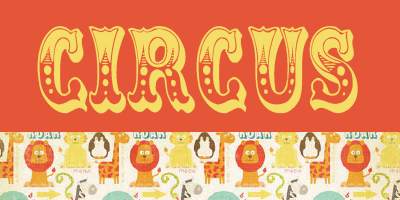
I am definitely in circus mode!  Make sure to tune in to Studio 5 today at 11 or check back later for fun circus party ideas that will be perfect for using this font.
Week 15- Circus! Follow these instructions to download this font:
1. Visit http://www.dafont.com/circus.font
2. Click on the “Download” button
3. Click “Open”
4. Select “Extract All Files” from the left menu bar
5. Click “Next” and continue through the extraction process.
6. Open your font folder by clicking on START→CONTROL PANEL→FONTS(double click to open folder)
7. Click on the “Circus” File that you downloaded and drag it into your font folder.  A box will appear saying that the font is downloading.  When it is complete, you should be able to access the font from all of your programs.

Font Friday

I am definitely in circus mode!  Make sure to tune in to Studio 5 today at 11 or check back later for fun circus party ideas that will be perfect for using this font.
Week 15- Circus! Follow these instructions to download this font:
1. Visit http://www.dafont.com/circus.font
2. Click on the “Download” button
3. Click “Open”
4. Select “Extract All Files” from the left menu bar
5. Click “Next” and continue through the extraction process.
6. Open your font folder by clicking on START→CONTROL PANEL→FONTS(double click to open folder)
7. Click on the “Circus” File that you downloaded and drag it into your font folder.  A box will appear saying that the font is downloading.  When it is complete, you should be able to access the font from all of your programs.

Friday, April 15, 2011

Font Friday

It may just be because I am feeling the need to stretch my wings and take a fun trip, but I am loving this font today.  It is formatted so great!  I typed the "Road" in capital letters and the "Way" in lowercase.  So cool!  I love it!
Week 15- Roadway! Follow these instructions to download this font:
1. Visit http://www.dafont.com/search.php?psize=m&q=roadway
2. Click on the “Download” button
3. Click “Open”
4. Select “Extract All Files” from the left menu bar
5. Click “Next” and continue through the extraction process.
6. Open your font folder by clicking on START→CONTROL PANEL→FONTS(double click to open folder)
7. Click on the “Roadway” File that you downloaded and drag it into your font folder.  A box will appear saying that the font is downloading.  When it is complete, you should be able to access the font from all of your programs.

Font Friday

It may just be because I am feeling the need to stretch my wings and take a fun trip, but I am loving this font today.  It is formatted so great!  I typed the "Road" in capital letters and the "Way" in lowercase.  So cool!  I love it!
Week 15- Roadway! Follow these instructions to download this font:
1. Visit http://www.dafont.com/search.php?psize=m&q=roadway
2. Click on the “Download” button
3. Click “Open”
4. Select “Extract All Files” from the left menu bar
5. Click “Next” and continue through the extraction process.
6. Open your font folder by clicking on START→CONTROL PANEL→FONTS(double click to open folder)
7. Click on the “Roadway” File that you downloaded and drag it into your font folder.  A box will appear saying that the font is downloading.  When it is complete, you should be able to access the font from all of your programs.